Gmail is about to fill your inbox with political spam. Here's how to skip it.


It’s impossible to miss election season. Signs show up in neighbors’ yards, the mountains of fliers pile up in the mail, and your email inbox fills up with political messages asking for donations or a vote. In the past, you could easily file these emails into the spam folder and rarely hear from the sender again, but not this year.

Google’s new verified sender program for Gmail lets politicians skip your spam filter and go straight to your inbox, whether you like it or not. Luckily, there are still ways to get rid of them.

The program ensures you can’t escape political advertisements.

Google recently unveiled its Gmail Verified Sender Program set to launch on September 8. Once it rolls out, verified senders, including politicians, can bypass any previous filters that would’ve sent them to your spam or junk folder. Instead, they’ll go straight into your inbox where they’re most likely to reach you.

Sounds like a nightmare, right?

According to Google, this system “helps eligible, verified political committees in the United States reliably deliver policy-compliant and non-abusive messages to personal Gmail accounts on an ongoing basis.” In reality, the program ensures you can’t escape political advertisements, at least not with the usual methods.

Politicians have to follow the rules

If there’s any saving grace, it’s that Google has some ground rules for any politician who wishes to use the new program. Politicians have to:

  • Refrain from sending anything that resembles spam, including unsolicited or repetitive emails. Theoretically, if you didn’t sign up for a political mailer, you shouldn’t be subjected to these messages in the first place.
  • Meet all of Google’s mass email guidelines, which include proper domain authentication and message formatting. All emails must also include an “unsubscribe” button for CAN-SPAM compliance.
  • Follow Gmail’s anti-abuse policy, which means they can’t attempt to commit fraud, promote illicit activities, engage in harassment, or other unsavory behaviors.

Furthermore, if more than 0.3% of respondents label an incoming email as spam across any rolling 14-day period, Google may suspend the politician’s email operations for seven days or terminate his or her email program entirely.

RELATED: Google is finally letting you change the most important thing about your Gmail account. Here's how.
Orbon Alija/Getty Images

How to keep political emails out of your inbox

Just because political emails can bypass your spam folder doesn’t mean there aren’t ways to keep them out of your inbox. In fact, Google’s rules alone show that there are still several things you can do to clear out the political clutter. Here are your options:

  1. Hit the unsubscribe button: By law, all commercial emails and advertisements — including political messages — are required to include a simple-to-find unsubscribe button at the bottom of the email. Click on that, confirm your decision on the next page that pops up, and you should be opted out of future email chains.
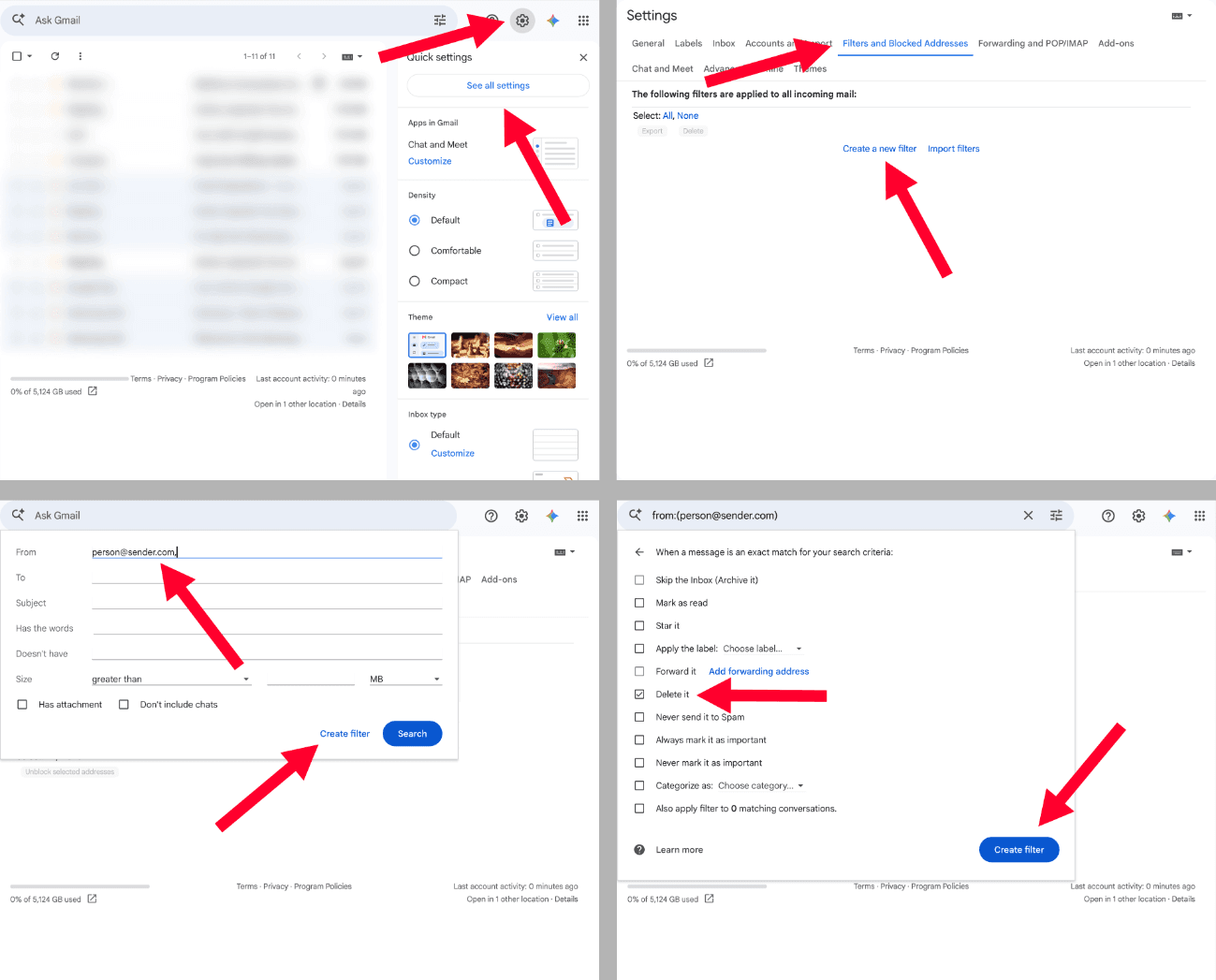
  2. Get creative with Gmail labels: Google gave Gmail a neat little trick that lets you target emails with specific keywords, or that arrive from certain senders, and automatically throw them in the trash. To set up one of these filters, open Gmail in your web browser on a computer, click the Settings cog in the top right corner, then select “See all settings.” From here, go to “Filters and blocked addresses,” and create a new filter. Type in the information you want to target and select “Create filter.” On the checkboxes page, mark “Delete it.” Lastly, click the “Create filter” button, and you’re all set. No more political emails.
Screenshots by Zach Laidlaw/Gmail

  1. Hit the spam button anyway: When a political email drops into your inbox, you reserve the right to relabel it as spam. While this may not keep the next email from that campaign from hitting your inbox again, your efforts can help suspend the account or even terminate it.
  2. Use a different email provider: When all else fails, you can always put your Gmail aside and use a different email provider that will let you block political messages from the start.

Election season is all about reaching as many voters on as many issues as possible, but that doesn’t mean you have to listen to it. Follow these steps and reclaim a bit of your sanity, at least for your email inbox.

Like Blaze News? Bypass the censors, sign up for our newsletters, and get stories like this direct to your inbox. Sign up here!

Epstein kept a detailed Google Calendar — and you can read all of his appointments


Sex offender and financier Jeffrey Epstein kept a brazenly detailed and jam-packed Google Calendar, recording flight plans and visits with notable figures.

The database comes in the form of a new website, from the same web designers who created Jmail.world, a clone of Epstein's Gmail inbox.

'I suggest inviting Al Gore on Sept 23 to Nantucket.'

The detailed schedule, organized on a Gmail Calendar app, is suitably named JCal.

In a typical entry, Epstein listed a "meeting with Scott Stackman and Ghislaine Maxwell" for May 31, 2016. Stackman was Epstein's alleged financial adviser, while Maxwell was his alleged confidante and procurer.

The calendar is full of meetings with elites from the entertainment industry and banking; Epstein even penciled in his attendance at movie screenings, along with a constant stream of flight details.

There are, for instance, several meetings and visits with Ariane de Rothschild, now CEO of Edmond de Rothschild Group in Switzerland, who married banker Benjamin de Rothschild in 1999. Benjamin died in 2021 at 57 years old of a heart attack.

"A production company in LA is doing a documentary film on Deepak Chopra's new book. He will film part of it as a lecture," Epstein reportedly wrote for September 23, 2016. "Al Gore 'Inconvenient Truth' style in Nantucket." He went on: "I should wait to discuss until Sept 18th unless I suggest inviting Al Gore on Sept 23 to Nantucket."

A screening of a Woody Allen movie is written in for December 16, 2016, with Allen himself listed as an attendee.

RELATED: Log into this Gmail clone to read all the Jeffrey Epstein emails as if you were Epstein himself

Other noteworthy meetings included those with Noam and Valeria Chomsky, and an Arianna Huffington event at the Madison Square location of membership club NeueHouse, which abruptly shuttered last year following the death of founder Joshua Abram after a long fight against multiple myeloma.

The online world has taken particular interest in making a mockery of Epstein through quick-turnaround projects Five Nights at Epstein's, a viral video game modeled after Five Nights at Freddy's, the popular online game and media franchise.

Five Nights at Epstein's has players monitor security cameras in Epstein's compound with the hope of avoiding encounters with various characters. In this game, players are on the receiving end of jump scares of clip art of President Trump, Stephen Hawking, and Epstein himself.

RELATED: Epstein files were allegedly compromised by foreign hacker in 2023; FBI admits 'cyber incident'

Image Credit Scott Olson/Getty Images
While Jmail was created by web designer Riley Walz and programmer Luke Igel, Newsweek reported Swedish that software engineer Matheus Mendes is behind JCal. To build the stunt, Mendes reportedly used Reducto, described as an AI document parsing and extraction software.

Walz has a history of making obscure humorous websites and programs, including a fast-food price comparison index and a random video viewer that shuffles iPhone videos uploaded to YouTube between 2009 and 2012.

Like Blaze News? Bypass the censors, sign up for our newsletters, and get stories like this direct to your inbox. Sign up here!

Log into this Gmail clone to read all the Jeffrey Epstein emails as if you were Epstein himself


A programmer has made it possible to read Jeffrey Epstein's infamous emails from his point of view.

The computer whiz, going by the name Riley Walz, has a history of creating unique webpages and even created a fake 2020 Republican candidate.

'You're logged in as Epstein and can see his emails.'

Walz is assumed to be in his early 20s given that he was described by CNN as a high school student from Upstate New York in February 2020.

The youngster's website features several links to obscure but clever programs he has created, like a fast-food price comparison index and a random video viewer that shuffles between YouTube videos uploaded between 2009 and 2012 from iPhones using their default file names.

For his latest endeavor, Walz, along with another young man named Luke Igel, created Jmail.world. While it is not clear what the "J" stands for in this case, the website is a Gmail inbox clone that lets users operate a replica version of Epstein's Gmail account.

"We cloned Gmail, except you're logged in as Epstein and can see his emails," Walz plainly wrote on X.

RELATED: Epstein files backfire as Democrats get pulled into their own trap

We cloned Gmail, except you're logged in as Epstein and can see his emails pic.twitter.com/6KsBY8kh3p
— Riley Walz (@rtwlz) November 21, 2025

The inbox includes the last message Epstein received at his "jeevacation@gmail.com" address, which was a July 14, 2019, note from Quora Digest.

Interestingly enough, the email included popular stories at the time, like "Why do you think the reason behind Trump abruptly canceling Pence's New Hampshire trip?" and "Why is Trump's trade war the wrong way to compete with China?"

Under a list of sidebar contacts, names like Ghislaine Maxwell, his confidant, activist Noam Chomsky, and attorney Alan Dershowitz are listed.

The emails also include numerous exchanges of articles and news clippings between Epstein and longtime Trump ally Steve Bannon. The dates range between February 2018 and April 2019.

RELATED: How GOP leadership can turn a midterm gift into a total disaster

Photo by SAUL LOEB/AFP via Getty Images

Emails between Epstein and Maxwell — who went by "Gxax" at times — ranged in nature, but included parody emails with Maxwell pretending to pen a message from Israeli Prime Minister Benjamin Netanyahu asking President Obama to rescind his citizenship.

"Dear President Obama:

I am writing today with a somewhat unusual request. First and foremost, I am asking that you return America to its August 20th, 1959 borders so that Hawaii is no longer a state and you are no longer a citizen," the email read.

Others showed Maxwell telling Epstein she would "have to distance myself from you in [a] statement."

"And they need me to say I was not aware of massage w/andrew in my house," it added.

Finally, readers can also view the emails that Democrats have widely circulated in an attempt to implicate President Trump, including a message where Epstein tells Maxwell that Trump "spent hours" at his house. Democrats redacted Virginia Giuffre's name, a victim of Epstein's that had previously noted that she never witnessed Trump do anything inappropriate.

In other emails to author Michael Wolff, Epstein said Trump "never got a massage."

Like Blaze News? Bypass the censors, sign up for our newsletters, and get stories like this direct to your inbox. Sign up here!

Disastrous Gemini Rollout Exposes Leftist Rot Permeating All Of Google

From Gmail to YouTube, it is time for a full reboot and reevaluation of how Google operates.

Strong Encryption Is A Must If Big Tech Is Creating Backdoors For Feds

Big Tech has been all too eager to share its users’ information.
Google to roll out AI tools for Gmail, Google Docs that automatically generate drafts


Google plans to unleash generative artificial intelligence tools for Gmail and Google Docs in the coming weeks that will automatically generate drafts, the Silicon Valley tech titan announced Tuesday.

"In Gmail and Google Docs, you can simply type in a topic you’d like to write about, and a draft will be instantly generated for you," Google Cloud CEO Thomas Kurian wrote in a post Tuesday, announcing the new features.

The new features will be rolled out to a "limited set of trusted testers" in coming weeks on a rolling basis throughout the year before making them available publicly.

Harnessing the power of generative AI will make it possible for Workspace users to "create, connect, and collaborate like never before," Google Workspace Vice President Johanna Voolich Wright said in a product announcement.

Wright noted that building AI features demands "great care" and said that the company is "building safeguards against abuse, protecting the privacy of user data, and respecting customer controls for data governance."

"AI is no replacement for the ingenuity, creativity, and smarts of real people," Wright said, noting that AI can sometimes get things wrong and oftentimes requires guidance.

More than 3 billion people already use AI-powered features in Google Workspace, the company reports. Current AI-powered features include "Smart Compose" in Gmail and auto-generated summaries in Google Docs, for example.

In addition to Gmail and Google Docs, Google Workspace also includes Calendar, Meet, Chat, Drive, Slides, Sheets, and more.

Wright says the new AI features will include the ability to:

  • draft, reply, summarize, and prioritize Gmail (an email service)
  • brainstorm, proofread, write, and rewrite in Docs (a word processing app)
  • get auto-generated images, audio, and video for Slides (a presentation app)
  • go from raw data to insights and analysis in Sheets (a spreadsheet app)
  • enable workflows in Chat (a group communication and collaboration tool)

One of the AI tools to which users will soon have access involves the capability to assist with rewrites. Wright provided a few examples including adopting a more formal tone in an email and transforming a bullet-point list into a more narrative-like summary.

For a "playful voice," users will be able to give the "I'm feeling lucky" option a try in Gmail.

The "I'm feeling lucky" button for Google's search is among its oldest features. Hitting the button on a desktop search with Google will port you automatically to the search result Google calculates will be most relevant.

Like Blaze News? Bypass the censors, sign up for our newsletters, and get stories like this direct to your inbox. Sign up here!

Politicians Who Refuse To Stop Big Tech’s Rabid Data Mining Are Complicit In Tyranny

Regulation will not be enough to stop Big Tech. We must also starve the beast that feeds on your private information and uses it against you.

RNC Lawsuit: Google ‘Intentionally’ Sending Republican Emails To Spam Is ‘Egregious Discrimination’

'Google is intentionally sending critical RNC emails to the spam folder because it’s the RNC sending them,' the group's lawsuit alleges.

Big Tech’s Censorship Ramps Up With Partisan Email Interference — So House Republicans Are Upping The Ante Too

Big Tech has a history of censoring conservatives, and it just got worse. House Republicans are fighting back.