Google is killing its popular Chromebook. Here's what's next — and how to prepare.
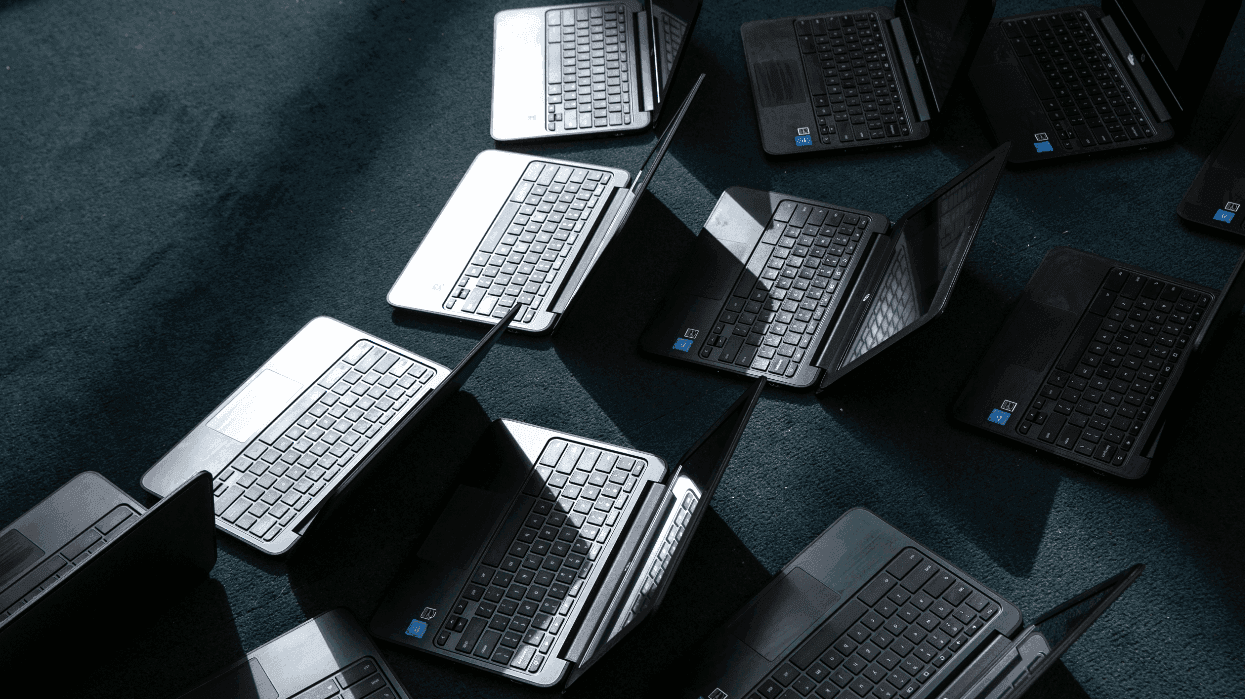


Google Chromebooks initially launched in Spring 2011. They’ve since become a mainstay of public education, thanks to their affordability, simple security, and ease of use. However, Google just announced a successor, and if Google has its way, it will be the thing to kill Chromebooks once and for all.

The somewhat clumsily named Googlebook is a hybrid device built to bridge the gap between Chromebooks and more capable machines like Windows PCs and Macs. It’s powered by Googlebook OS, a version of Android tuned specifically for desktop. It also borrows some features from Chromebooks, helping the platform feel familiar to anyone already in Google’s ecosystem.

Googlebooks aren’t quite as mature as their Chromebook siblings, but that isn’t stopping Google from officially killing the latter anyway.

Just like a Windows or Mac computer, you can connect a mouse and keyboard, drag and drop files to your desktop, enjoy a full desktop browser experience, complete with extensions, and use apps to get work done.

It has full access to the Google Play Store library, where some apps like the photo editor Luminar and the calendar app Fantastical already have desktop-class versions on the platform, in addition to the mobile Android counterparts.

Googlebooks also have a Debian Linux command-line environment that can be accessed through the Terminal. According to Google, “You can install and run developer tools, code environments, and access other Linux applications.”

One of the cooler features, though, is that Googlebooks offer better interoperability between the new laptop and some existing Android phones. With Continue On, you can start a task on your phone and easily pick up that same task in the same spot on your Googlebook. Your files from your phone also automatically show up in the files app in Googlebook. You can cast an app from your phone to your laptop for easy use. You can even sync your phone notifications to your laptop.

Ultimately, Googlebooks are a huge upgrade from Chromebooks with premium materials, powerful chips, and a more capable operating system.

RELATED: How the laptop revolution destroyed public education

Blaze Media illustration

Unfortunately, there are also some clear drawbacks, at least at launch. Now that these machines are out in the wild, reviewers have found some serious flaws.

For instance, some Progressive Web Apps, or apps that you can download from the web when a native app isn’t available, don’t work on Googlebooks like they did on Chromebooks. Broader support is coming soon, but for now, it’s limited.

The interoperability features between Android and Googlebook require Android 17, which means many Android users will be left behind. These features also don’t work on Samsung devices yet, which account for most of the Android devices in the United States.

There are five Googlebooks available from different OEMs at launch — two of them have an ARM-based chip, similar to the ones in virtually all smartphones today, and three of them have x86 chips, like those found in most Windows laptops. Android works on both architectures, but some Google Play apps aren’t compatible with x86, creating potential fragmentation.

Needless to say, Googlebooks aren’t quite as mature as their Chromebook siblings, but that isn’t stopping Google from officially killing the latter anyway.

When Googlebooks were first unveiled in May, Google made it clear that this new brand targeted the premium hardware market, while Chromebooks were meant to represent the affordable segment. Although Google didn’t divulge official details, there were rumors that both platforms would exist together, catering to different groups in their respective categories. After all, a $300 Chromebook is easier to give to a 3rd grader than a $999 Googlebook.

Unfortunately, that’s not the case. Google confirmed that it will phase out support for ChromeOS — the operating system that runs on Chromebooks — by 2034. Existing Chromebooks will continue to receive updates until that time.

On the bright side, Google said that, “Many newer commercial Chromebook models will be capable of upgrading to Googlebook OS. Details on migration paths and device eligibility will be shared at a later date.”

So newer Chromebooks will get a new lease on life with Googlebook OS, while older models will no longer be supported. That doesn’t mean the devices will cease to operate, but they will no longer receive security patches, potentially leaving your data open to hackers if you continue to use a Chromebook past 2034.

The long lead time is meant to give users and educators time to switch platforms over the coming decade, but the elephant in the room remains. Googlebooks are much more expensive than their Chromebook counterparts, and while Google is sure to iron out the bugs discussed above, the laptops that launched this month are more akin to test devices than full-fledged products.

If you own a Chromebook, it might be best to hold onto it for now. For those on Windows or Mac who are thinking about switching, just know that there are still some early hiccups that must get sorted out.

Like Blaze News? Bypass the censors, sign up for our newsletters, and get stories like this direct to your inbox. Sign up here!

SpaceX's newest launch just took the first step to fill the skies with data centers


The AI space race is under way as Google officially launched the first AI data center into orbit with some help from SpaceX — sort of. Project Suncatcher is a small satellite equipped with data center components, like Google’s custom Tensor Processing Units, assembled to see if AI can survive the brutal vacuum of space.

Elon Musk has big dreams for the cosmos. Earlier this year, he famously unveiled plans to colonize the moon with the first-ever lunar city, dubbed Moonbase Alpha. Once established, it would become a launchpad for other galactic endeavors, including the first manned mission to Mars and orbital data centers meant to power AI platforms on Earth down below.

Ultimately, Google wants to find out if its TPUs can survive sustained radiation without hardware failures.

At the time, Google’s AI space ambitions were merely a footnote, with CEO Sundar Pichai stating, “We’ll send tiny, tiny racks of machines, and have them in satellites, test them out, and then start scaling from there.” The goal for this test project was originally 2027, but Google jumped ahead by putting its first data center into orbit on October 1.

Ironically, Project Suncatcher was ushered to space on a ridesharing mission led by SpaceX. A Falcon 9 rocket — the same that will eventually take mankind to the moon to build Moonbase Alpha and establish Musk’s space data center empire — ultimately delivered Google’s satellite safely to its destination.

The mission was deemed a success, and Project Suncatcher is currently collecting data to transmit back to Google.

RELATED: The truth about how AI data centers affect local communities

Matthew Fowler/Getty Images

When diving into why AI innovators want to put data centers into space, the benefits are clear. According to a peer-reviewed report by Google, the sun generates a staggering 100 trillion times more power than every electrical grid around the world combined. In comparison, space has near-infinite power that can sustain a multitude of data centers without taking energy away from local communities or even each other. This alone is enough to spur spacefaring AI research.

The second goal is to see how well data center components hold up in space. The great void beyond Earth’s atmosphere is teeming with radiation. In fact, there are two types of radiation to consider: Ionizing radiation consists of electromagnetic waves with the power to separate electrons from atoms and molecules in everything they touch. In short, they can wreak havoc on computer systems, processing chips, and other components, all leading to a mass hardware failure. Non-ionizing radiation, on the other hand, is less powerful and cannot separate electrons from atoms or molecules, though it can still be harmful in some situations.

Google wants to find out if its TPUs can survive sustained radiation without hardware failures. So far, artificial tests here on Earth suggest Google TPUs can withstand up to five years of space-level radiation before failure, resulting in a replacement. The only way to know for sure, though, is to measure their performance in real space conditions.

Third, Google is testing a flight system that guides a cluster of AI data center satellites orbiting together instead of one giant data center. The peer-reviewed paper calls them “satellite constellations.” Smaller, modular satellite clusters will ultimately be easier to deploy, maintain, and update as each satellite can be repositioned or pulled from orbit at any time without affecting the other satellites in the fleet.

Ultimately, Project Suncatcher is a stress test to see if space-bound data centers are viable. Google will spend the next several weeks gathering data. If all goes well, we could have functioning AI data centers in orbit by the early to mid-2030s.

Like Blaze News? Bypass the censors, sign up for our newsletters, and get stories like this direct to your inbox. Sign up here!


Google invites itself into your closet — to help you try on your clothes


Would you let Google snoop around your closet? Your closet is a sacred domain for your most personal items, and now Google wants to peek inside. A new feature in Google Photos lets you virtually mix and match clothing items to create new outfits without physically trying them on. All it needs is an AI scan of you and your photo library to build your digital wardrobe.

That’s what the company hopes you’ll allow with the new Wardrobe feature in Google Photos. This was first announced back in April of this year, and after several long months and a multi-stage rollout, it is finally available to both Android and iOS users through the Google Photos app.

If your creep-o-meter is already leaning at full tilt, you’re not alone.

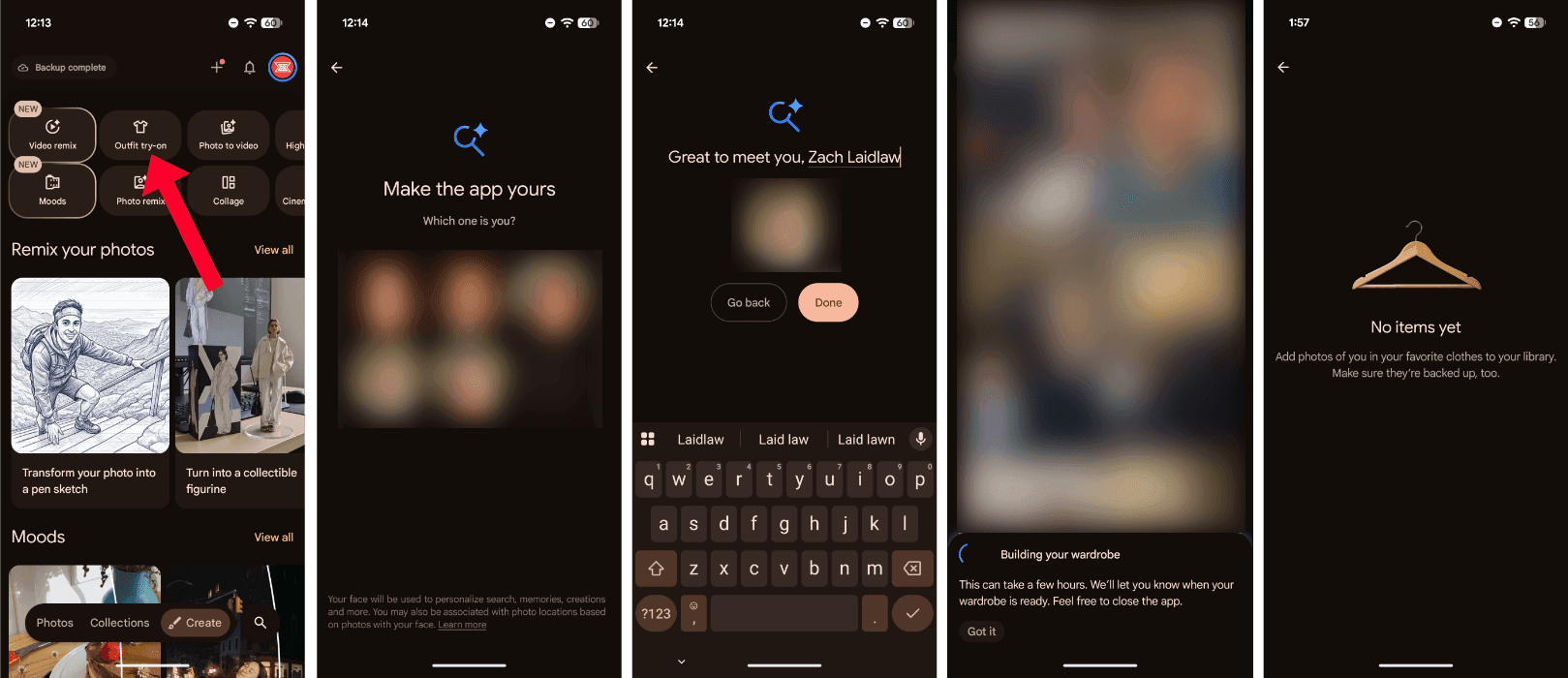
To find the new Wardrobe feature, open the Google Photos app, tap the “Create” tab at the bottom, and select “Outfit try-on” at the top. From here, you can start to build your digital wardrobe. All you have to do is let Google scan through your photo library in search of existing images of you that its AI can use to identify your face, body type, and clothing options from outfits you own.

If your creep-o-meter is already leaning at full tilt, you’re not alone. There’s something a bit skeevy about unleashing Google’s AI on your entire library so that it can build a digital model of you and every outfit you have worn throughout thousands of images.

And yet, for the sake of this article, I hit the button and let it root through my digital life to see what Wardrobe was all about. The process can take several hours, so feel free to run it in the background while you go about your day, if you’re so inclined.

Wardrobe in Google Photos/Zach Laidlaw

Alas, I didn’t meet the minimum requirement to put my wardrobe to use. You need at least 1,000 photos of yourself wearing easily identifiable clothing; otherwise the feature will come up blank.

For those who fit the bill, though, the feature lets you digitally “try on” up to six different items — including shirts, pants, and accessories — in your closet without going through the trouble of putting them on, similar to the clothing picker in the movie "Clueless." This lets you easily see which items would go well together to better plan an outfit for the day.

The only thing you can’t do is add photos of clothes you find online to see how they look on you without buying them. Google's Wardrobe is strictly meant for the things you already wear — at least for now.

RELATED: Google's new daily helper knows all about you. Just how creepy is it?

Marina113/Getty Images

Naturally, Wardrobe in Google Photos raises plenty of concerns for potential misuse and abuse. For instance:

  1. It’s available to anyone with “an eligible Google Account that meets the minimum age requirements for your country or region.” In the United States, that age limit is 13. Digging deeper into Google’s age restrictions, users as young as 13 are permitted to use Google AI via Gemini, though some generative AI photo features are reserved for users 18 years old and up. It’s unclear where Wardrobe fits into this structure and whether or not minors can be scanned and uploaded into the system.
  2. Google Photos lets you choose which person you want to stylize at the initial setup, aside from yourself. That means you can technically select a friend, family member, or a complete stranger to use as a digital doll to test outfits as you see fit.
  3. Some garments are more intimate than others. There is no documentation as to how Google’s Wardrobe handles more private apparel, should these appear in a photo scan.

Blaze News reached out to Google to clarify these misuse and abuse concerns, and a spokesperson provided the following response:

We take protecting kids seriously. We have strong safeguards for the Google Photos Wardrobe feature, including restrictions on allowed clothing types, modesty guardrails to prevent nudity, and age limits that prevent access by younger users.

Google added that revealing clothing, like swimwear and lingerie, are prohibited for all users. “Child account holders” under age 13 cannot use the Wardrobe in Google Photos at all, though based on Google’s age criteria, underage teenagers may still have access. Lastly, Wardrobe is governed by Google’s generative AI prohibited use policy that strictly prohibits the creation of intimate imagery, child exploitation, and abuse.

Since Wardrobe is closely tied to Google’s AI endeavors, it’s restricted to Google AI Pro and AI Ultra subscribers for now. However, as with many of Google’s paid exclusives, Wardrobe could eventually trickle down to free customers as well. Luckily, Google’s Wardrobe feature can’t activate until you enable it manually.

Like Blaze News? Bypass the censors, sign up for our newsletters, and get stories like this direct to your inbox. Sign up here!

Google's data-devouring AI wants everyone's personal information


Google’s new Daily Brief for Gemini is both cool and creepy, but up until recently, it was locked behind a paid subscription, away from the masses. Months later, the data-devouring feature is now available for everybody. Here’s how to make sure it isn’t already gobbling up your private data.

Daily Brief is a relatively new feature built into the Google Gemini app. Every morning, it scours through the information saved in your Google apps to surface a daily agenda of tasks, reminders, and events custom-tailored for you.

Once Daily Brief is enabled, Gemini can dig through everyone’s Google apps in search of relevant information.

When I tested Daily Brief earlier this year, I found it paradoxical. For those in the Google ecosystem, it can be a handy tool to remember things you otherwise forgot — a birthday for a loved one, to follow up on an email you sent the other day, to dig deeper into a topic you searched on Google. If you’re not an avid Google user, though, it’s mostly useless.

The more data Gemini can gather from your Google apps, the better the brief. At the same time, the more data it has, the more Google learns about you to feed into its AI machine.

Since Daily Brief is part of the Gemini core experience, it isn’t exclusive to Google’s Pixel phone series or even Android. It’s available on iOS and the web too, expanding its reach to cover practically any user with a Google account. The goal, of course, is to get you to rely on Gemini so that Google can pull you into its broader AI platform and away from the likes of ChatGPT, Claude, and Grok.

RELATED: Surprise! These top AI bots are politically left wing

chiewr/Getty Images

Like many Gemini features, Daily Brief started as a paid perk back in May, and now it’s available to the masses for free. That means, once Daily Brief is enabled, Gemini can dig through everyone’s Google apps in search of relevant – i.e., private and personal – information, free of charge.

So it is already digging through your data right now?

In a word, no. Google made the right choice when it locked Daily Brief behind a manual setup process, so unless something went terribly wrong, the feature should be disabled on your account by default. However, if you’re curious about the feature, or if you want to ensure it’s actually turned off so it can’t gobble up your data, you might still want to confirm if it’s on or off.

To check how Daily Brief is configured, open the Gemini app on Android, iOS, or the web. Using the mobile version as a reference, tap on your profile picture in the top right corner. On the next page, choose “Personal Intelligence.” At the bottom, find “Daily brief.”

Screenshots by Zach Laidlaw/Android 17 on Google Pixel 10 Pro XL

To make sure Gemini can’t scan through your Google app data for future briefs, uncheck the toggle switch so that it’s grayed out. On the flip side, if you want to try Daily Brief and see what it’s all about, check the toggle so that it lights up blue.

Screenshots by Zach Laidlaw/Android 17 on Google Pixel 10 Pro XL

For those who don’t want to use Daily Brief, that’s all you need to do. It’s officially turned off, and it won’t dig through your data going forward.

For those who turned it on, go back to the first screen in the Gemini app. Next, tap the hamburger menu in the top left and select “Daily Brief” from the slide-out section. Here is where your Daily Briefs will live on your device.

Screenshots by Zach Laidlaw/Android 17 on Google Pixel 10 Pro XL

Every morning, you will receive a notification with a new brief for tasks you need to accomplish today and throughout the rest of the week. If you don’t want to receive notifications, tap on the three dots in the top right corner, and uncheck the notifications switch. This way, your Daily Brief is still ready and accessible every morning, but your phone won’t nag you to open it.

Whether you wish to keep Daily Brief enabled for its useful features or disabled for the sake of privacy, the choice is ultimately up to you. It’s easy enough to adjust the setting if you change your mind.

Like Blaze News? Bypass the censors, sign up for our newsletters, and get stories like this direct to your inbox. Sign up here!

China’s hackers are hiding in plain sight


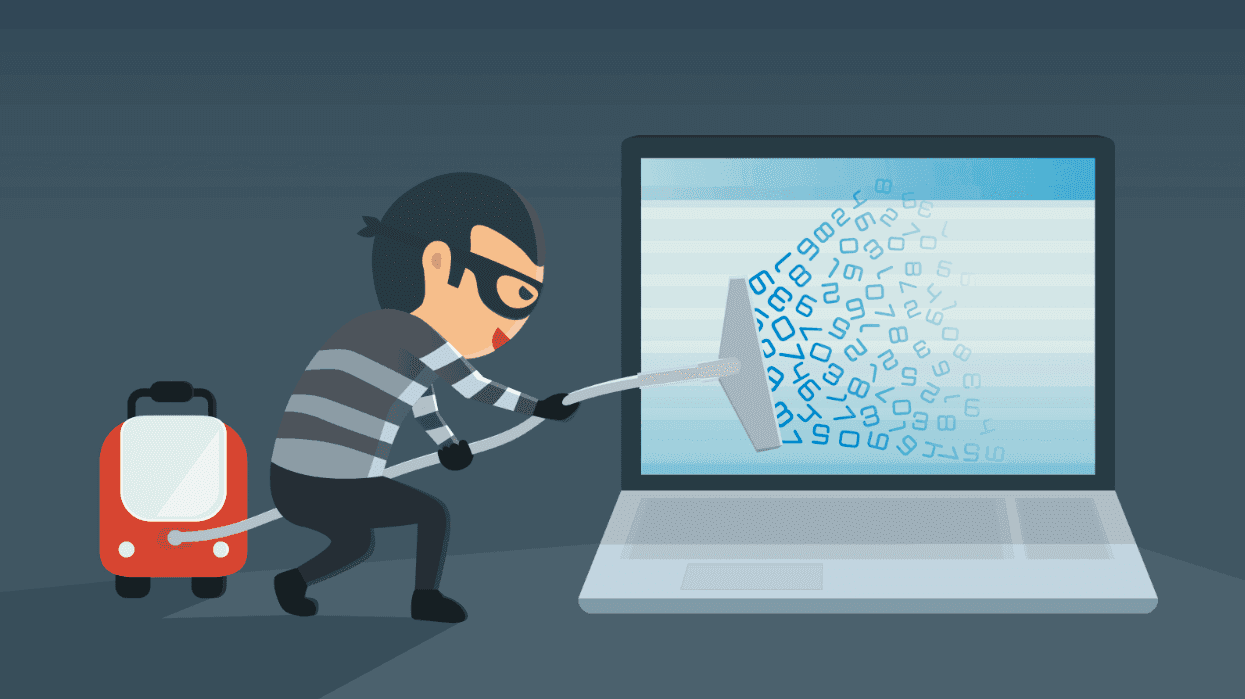
Google recently reported that a China-linked hacking group ran artificial intelligence tools inside compromised networks. The technique let the hackers use victims’ computing resources and credentials while reducing the traffic that might expose them. The group also targeted North American academic, medical, military, and technology-research institutions. That is a serious warning.

The disclosure followed a Justice Department and FBI operation against QScan and QTRouter, two platforms allegedly used by a Chinese state-sponsored group known as QTFY. Prosecutors say the group, employed by Nanjing Xinjiuwei Network Technology, sold hacking services to customers that included China’s Ministry of State Security and People’s Liberation Army.

Chinese cyberattacks are only going to get more capable. We need a concerted plan to protect our infrastructure and private information before it’s too late.

Court records identify NASA, the Federal Reserve, the Departments of Energy, Justice, and Health and Human Services, the National Institutes of Health, and the U.S. Senate among the targets. They also list hospitals, telecommunications providers, power companies, financial institutions, and defense contractors. The public evidence does not show that every listed network was breached. Still, it’s a major concern.

The operation illustrates how Beijing can combine government direction, private contractors, compromised devices, and commercial infrastructure in a sustained espionage campaign. Diplomatic engagement with Chinese leaders does not eliminate that threat, and cybersecurity policy must account for it regardless of the state of bilateral relations.

On Aug. 26, the same day officials announced the QScan and QTRouter seizures, the White House declared a national emergency involving foreign-produced bulk-power equipment. The order lets the government restrict transactions involving equipment that poses an unacceptable security risk as well as identify, isolate, monitor, or replace vulnerable components.

The risk is substantial. Grid operators increasingly depend on networked sensors, controllers, and other devices associated with the “internet of things.” Connectivity can improve efficiency and monitoring, but it also expands the attack surface. The fear is less that China will shut off the lights tomorrow than that it will slowly gain the ability to cause blackouts and spread panic — a security advantage it can leverage.

The administration’s Cyber Strategy for America calls for hardening critical infrastructure and its supply chains, including the energy grid, data centers, water utilities, hospitals, and telecommunications systems. The recent cases show why that work must extend beyond power plants to vendors, contractors, and the devices that connect essential services.

Cyber defense is only part of the problem. Washington must also decide how to evaluate Chinese companies whose technology enters sensitive American systems.

Nanjing Xinjiuwei is a useful example: The government alleges that the company employed QTFY and received payments from China’s Ministry of State Security. No surprise that plenty of other Chinese companies have also engaged in espionage.

The Pentagon this summer added Alibaba and BYD to its list of entities it identifies as Chinese military companies operating in the United States, effectively banning them from securing defense contracts. What took so long?

RELATED: America’s adversaries are using top American tech — without telling their customers

Smederevac/iStock/Getty Images

Huawei presents a more dangerous case. The Justice Department has accused Huawei and several subsidiaries of racketeering, trade-secret theft, and concealing business in countries subject to sanctions. Separately, federal law restricts agencies and contractors from using specified Huawei telecommunications equipment, and regulators have designated the company’s equipment a national-security risk.

The company’s U.S. research affiliate, Futurewei, also drew congressional scrutiny after lawmakers said it shared a California office complex with Nvidia for years. Nvidia has said its operations remained separate. Huawei’s past relationships with American universities likewise prompted several institutions to review or end research funding arrangements.

The American economic system is open by nature, and this risks allowing easy access to malefactors like Huawei.

Successive administrations have maintained or expanded restrictions on Huawei while encouraging alternatives in the global telecommunications market. National-security officials also cited competition with Huawei when supporting the Hewlett Packard Enterprise acquisition of Juniper Networks. That case illustrates how industrial policy can overlap with security interests.

The Center for Strategic and International Studies has catalogued 224 reported instances of Chinese espionage directed at the United States since 2000. Its survey excludes espionage against U.S. allies and more than 1,200 intellectual-property lawsuits brought by American companies against Chinese entities.

The policy challenge is broader than any single breach or company. The United States must secure critical networks, investigate firms on the evidence, enforce procurement and export-control rules consistently, and work with allies on interoperable alternatives.

Chinese cyberattacks are only going to get more capable. We need a concerted plan to protect our infrastructure and private information before it’s too late.

For years, the government tried to prove Google should be broken up. There's finally a verdict.


Throughout the Biden administration, Google was locked in two antitrust cases — one over its search engine dominance and another for its digital advertising business. For remedies, Google was at risk of divesting some of its most prized products, including Chrome and Google Ads. However, a new decision will let Google keep its toys in the end.

To understand the scope of this story, we have to go back to October 2020 when the first complaint was filed by the United States District Court for the District of Columbia. The document accused Google of a Sherman Act violation — the bill that bans monopolistic practices — and ultimately aimed to bring action against the tech giant for “unlawfully maintaining monopolies in the markets for general search services, search advertising, and general search text advertising in the United States.”

Google risked divesting several of its major products and services.

The case would ultimately go to trial in late 2023 with Obama-appointed District Judge Amit Mehta presiding, but not before a second antitrust case tried to bring Google to its knees once more.

In early 2023, another complaint was filed, this time aimed directly at Google’s online ad business. It claimed that the company:

  • Monopolized the ad server market, which is the software that website publishers use to manage the ads on their websites.
  • Monopolized or attempted to monopolize the ad exchange market, which is a digital auction where publishers sell ad space to advertisers.
  • Monopolized the advertiser ad network market, which is a system that gathers up available ad space from multiple publishers to sell to advertisers.
  • Was complicit in unlawful tying, where a company uses its dominance with one product to coerce users to adopt another product under the guise that their pairing is necessary to make the system of platform work as intended.
  • Brought monetary damages upon the United States.

RELATED: Google's AI overhaul of Search will overfish the internet to extinction

bgblue/Getty Images

The collective charges from both cases resulted in multi-year trials, each with major repercussions mounting for the tech giant. At one point, Google risked divesting several of its major products and services, including the Google Chrome browser, the Android mobile operating system, and Google Ads. And somehow, bit by bit, Google clawed its way out of total calamity.

In September 2025, District Judge Mehta ruled that Google would not have to sell Chrome or Android. However, the company was still found guilty in that it “harmed Google’s publishing customers, the competitive process, and, ultimately, consumers of information on the open web,” according to a press release. To atone, Google was forced to:

  • End bundled contracts, where Google forced OEMs and partners to include Google apps on their devices in exchange for Google Play Store support.
  • Disclose web search index data with rivals for a small fee, excluding trade secrets and intellectual property.
  • Allow rivals to rent Google search results, maps, and other services on their websites with tapered plans that diminished over the next five years.
  • Provide a five-year license to competitors to use Google’s search ad network.
  • Submit to a five-member watchdog group to ensure all remedies were met for six years.

Things were looking up for Google, but it wasn’t out of the woods yet. The second case was still underway, and after Clinton-nominated District Judge Leonie Brinkema found the company guilty again, a new batch of devastating remedies were on the table. This time, Google risked having to:

  • Sell its Google Ads business, including Google AdX (aka: Google Ad Exchange) and Google DFP (aka: DoubleClick for Publishers), formerly known as Google Ads Manager.
  • Discontinue tying practices for a minimum of 10 years.
  • Put 50% of Google Ads (AdX and DFP) profits into a locked escrow account from April 17, 2025, until the Google Ads sale is complete.
  • Refrain from using data collected through Google services — like YouTube, Gmail, Search, Chrome, or Android — to exclude competitors for a minimum of 10 years.
  • Submit to two independent watchdog groups to ensure the sale is carried out properly and that all rules are met.

RELATED: How Google went from American innovation to tech stagnation

sesame/Getty Images

Fast-forward to September 2026, and now the final major repercussion is no longer in play. District Judge Brinkema ruled that Google will not have to sell its ad business after all, allowing the company to keep all of its main products and services intact.

That said, consequences still loom for the Big Tech giant. Like in the case before it, Google will have to make behavioral changes to its business model. The exact remedies are still sealed in District Judge Brinkema’s official opinion, which is expected to be released by the end of September.

Regardless of the information contained inside, one thing is clear: Google earned the ire of the courts, got itself slapped down with two back-to-back antitrust lawsuits, and even as it stumbled on the cusp of the biggest company breakup since AT&T, the tech giant still came out with all of its parts attached. Only time will tell if Google can keep its nose out of trouble.

Like Blaze News? Bypass the censors, sign up for our newsletters, and get stories like this direct to your inbox. Sign up here!

It just got easier to pay at Walmart, if you follow these simple steps


Mobile-based contactless payment services are 15 years old, starting with Google Wallet in 2011 (which later became Google Pay), followed by Apple Pay in 2014. Many stores slowly rolled out support over years of foot-dragging, while large chains like Walmart tried to push their own payment solution. However, after nearly two decades of hemming and hawing, the retail giant is finally caving in. Here’s what you need to know before the next time you try to buy something at Walmart with Apple Pay or Google Pay.

While Google was the first to bring contactless payments to mobile, the industry took notice when Apple introduced its own solution to the market. Built around the wildly successful iPhone and Apple Watch, Apple Pay quickly picked up steam. Today, it accounts for 50% of in-store transactions in the United States, while Google Pay only covers 17%. Globally, that makes up a difference of $9.5 trillion spent through Apple’s ecosystem versus $5.2 trillion on Google’s platform.

The rollout has already begun at select locations.

It wasn’t always that way, though. In the earlier days of contactless payments, the market was more like the Wild West with various companies jockeying for control. Some stores even launched their own payment services to compete.

Walmart Pay ruined the party

Walmart released Walmart Pay in 2015 as a direct in-store alternative to Apple and Google. The key selling point, at least for Walmart, was that its payment service worked with a QR code system. That meant any customer could use any phone to scan the code at the register to connect to their Walmart account and submit a payment.

RELATED: A YouTube stunt proved this Apple Pay exploit can drain your bank account in seconds. Here's the fix.

NanoStockk/Getty Images

Unfortunately, the process was clunkier than Apple Pay and Google Pay, which only required users to hover their devices over payment terminals and authenticate with a fingerprint or FaceID. Walmart Pay also gave the retail giant the power to monitor customers’ purchases and link them to their accounts — a stark difference to Apple Pay and Google Pay that hide identifying customer information and transaction data from merchants.

In other words, Walmart Pay gave the company insight into customers’ shopping habits that it couldn’t get from other platforms ... until now.

Contactless payments are coming to Walmart

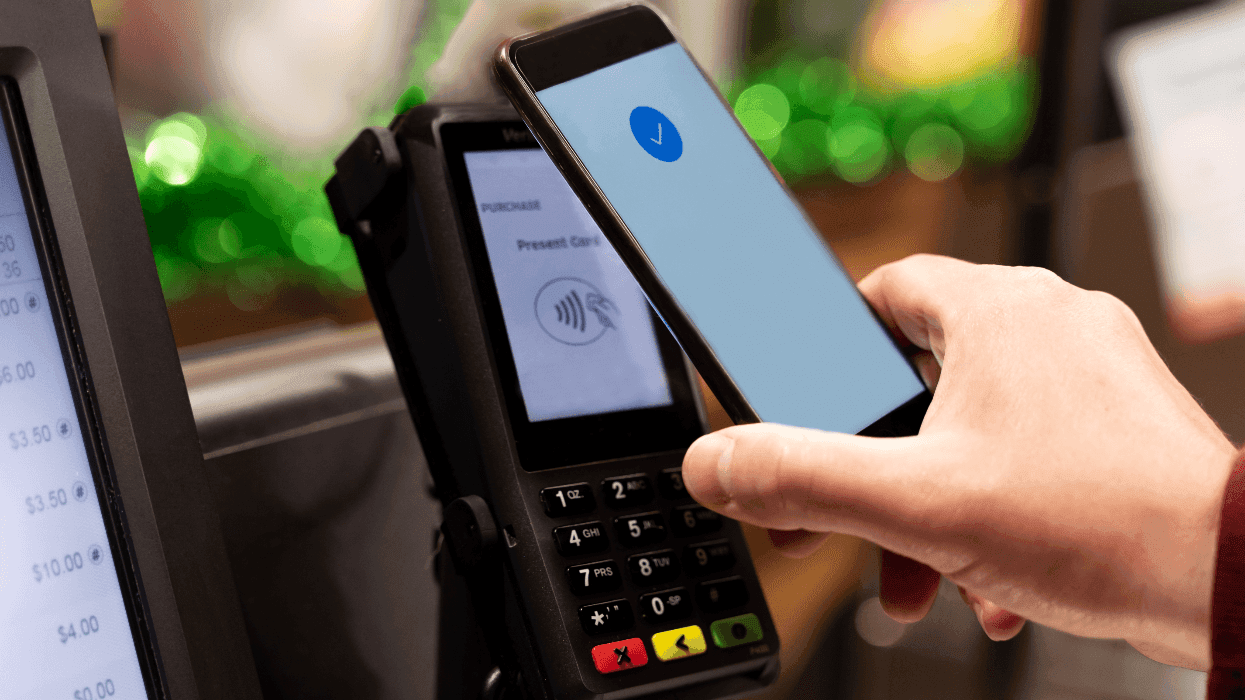
After all these years of waiting, Walmart announced that it is finally giving customers the choice to use other contactless payment options. As a result, customers will soon be allowed to complete purchases with Apple Pay and Google Pay at the register in Walmart stores and Sam’s Clubs nationwide.

The rollout has already begun at select locations, and all stores will have access to these services by the end of 2026. After that, Walmart and Sam’s Club fuel stations will gain contactless support by mid-2027. This change also means that customers should have the option to use contactless payment credit cards and debit cards with EMV chips, as well.

How to make sure your phone is set up for contactless payments

Now that you can buy things with your phone at Walmart, you’ll want to make sure your device is set up before you walk into the store.

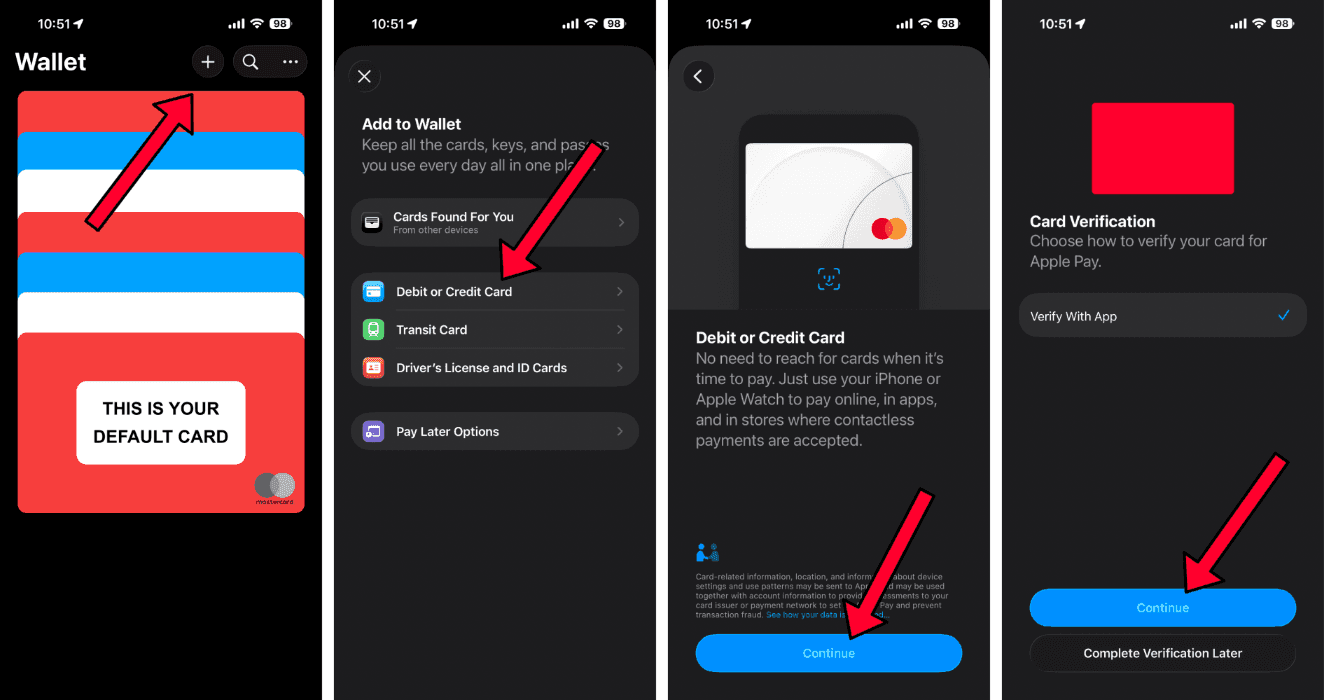
To add a card to Apple Pay, open the Wallet app on iPhone, select the plus symbol in the top right corner, and choose “Debit or Credit Card.” From there, you can place your iPhone against the card to add it automatically through the EMV chip, or type in the card details by hand. Once the card is added, you may have to verify the information with your bank or credit union through the bank’s official app or via a text or phone call. Do this, and you’re all set to use Apple Pay.

Screenshots by Zach Laidlaw/Apple Pay

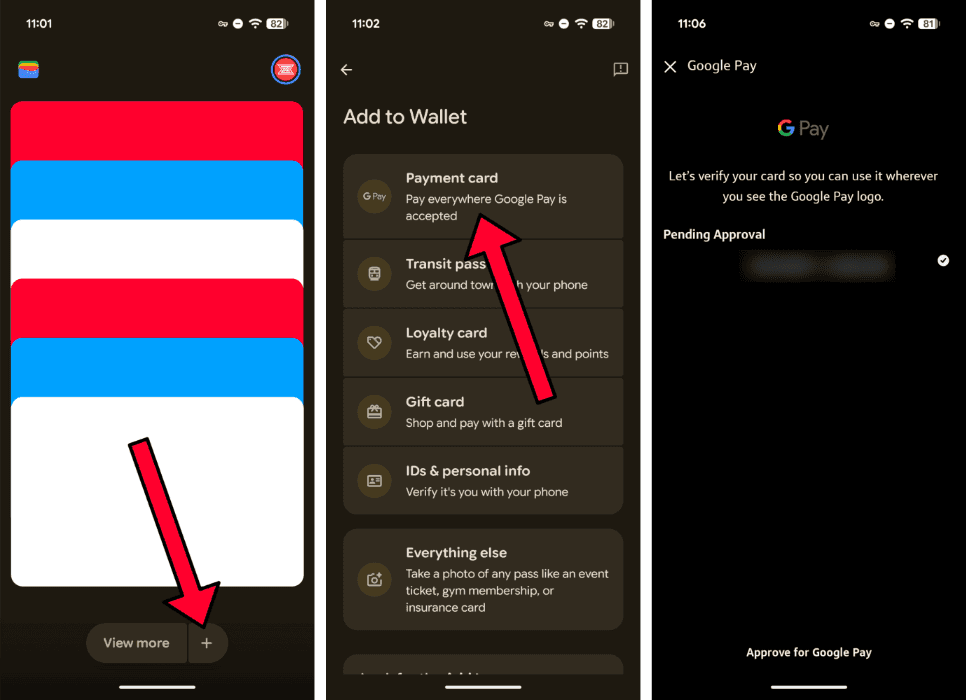
On Android, open the Wallet app and tap the plus button at the bottom. On the next screen, select “Payment card,” then “new credit or debit,” and let the app take a photo of your card to add the details. You can also write them in manually, if you prefer. Verify the information with your bank or credit union, and you’re all set to use Google Pay.

Screenshots by Zach Laidlaw/Google Pay
In the end, contactless payments on iPhone and Android are more convenient and secure than tapping your credit card at the register or trusting an alternative payment solution, like Walmart Pay.

Like Blaze News? Bypass the censors, sign up for our newsletters, and get stories like this direct to your inbox. Sign up here!

Gmail is about to fill your inbox with political spam. Here's how to skip it.


It’s impossible to miss election season. Signs show up in neighbors’ yards, the mountains of fliers pile up in the mail, and your email inbox fills up with political messages asking for donations or a vote. In the past, you could easily file these emails into the spam folder and rarely hear from the sender again, but not this year.

Google’s new verified sender program for Gmail lets politicians skip your spam filter and go straight to your inbox, whether you like it or not. Luckily, there are still ways to get rid of them.

The program ensures you can’t escape political advertisements.

Google recently unveiled its Gmail Verified Sender Program set to launch on September 8. Once it rolls out, verified senders, including politicians, can bypass any previous filters that would’ve sent them to your spam or junk folder. Instead, they’ll go straight into your inbox where they’re most likely to reach you.

Sounds like a nightmare, right?

According to Google, this system “helps eligible, verified political committees in the United States reliably deliver policy-compliant and non-abusive messages to personal Gmail accounts on an ongoing basis.” In reality, the program ensures you can’t escape political advertisements, at least not with the usual methods.

Politicians have to follow the rules

If there’s any saving grace, it’s that Google has some ground rules for any politician who wishes to use the new program. Politicians have to:

  • Refrain from sending anything that resembles spam, including unsolicited or repetitive emails. Theoretically, if you didn’t sign up for a political mailer, you shouldn’t be subjected to these messages in the first place.
  • Meet all of Google’s mass email guidelines, which include proper domain authentication and message formatting. All emails must also include an “unsubscribe” button for CAN-SPAM compliance.
  • Follow Gmail’s anti-abuse policy, which means they can’t attempt to commit fraud, promote illicit activities, engage in harassment, or other unsavory behaviors.

Furthermore, if more than 0.3% of respondents label an incoming email as spam across any rolling 14-day period, Google may suspend the politician’s email operations for seven days or terminate his or her email program entirely.

RELATED: Google is finally letting you change the most important thing about your Gmail account. Here's how.

Orbon Alija/Getty Images

How to keep political emails out of your inbox

Just because political emails can bypass your spam folder doesn’t mean there aren’t ways to keep them out of your inbox. In fact, Google’s rules alone show that there are still several things you can do to clear out the political clutter. Here are your options:

  1. Hit the unsubscribe button: By law, all commercial emails and advertisements — including political messages — are required to include a simple-to-find unsubscribe button at the bottom of the email. Click on that, confirm your decision on the next page that pops up, and you should be opted out of future email chains.
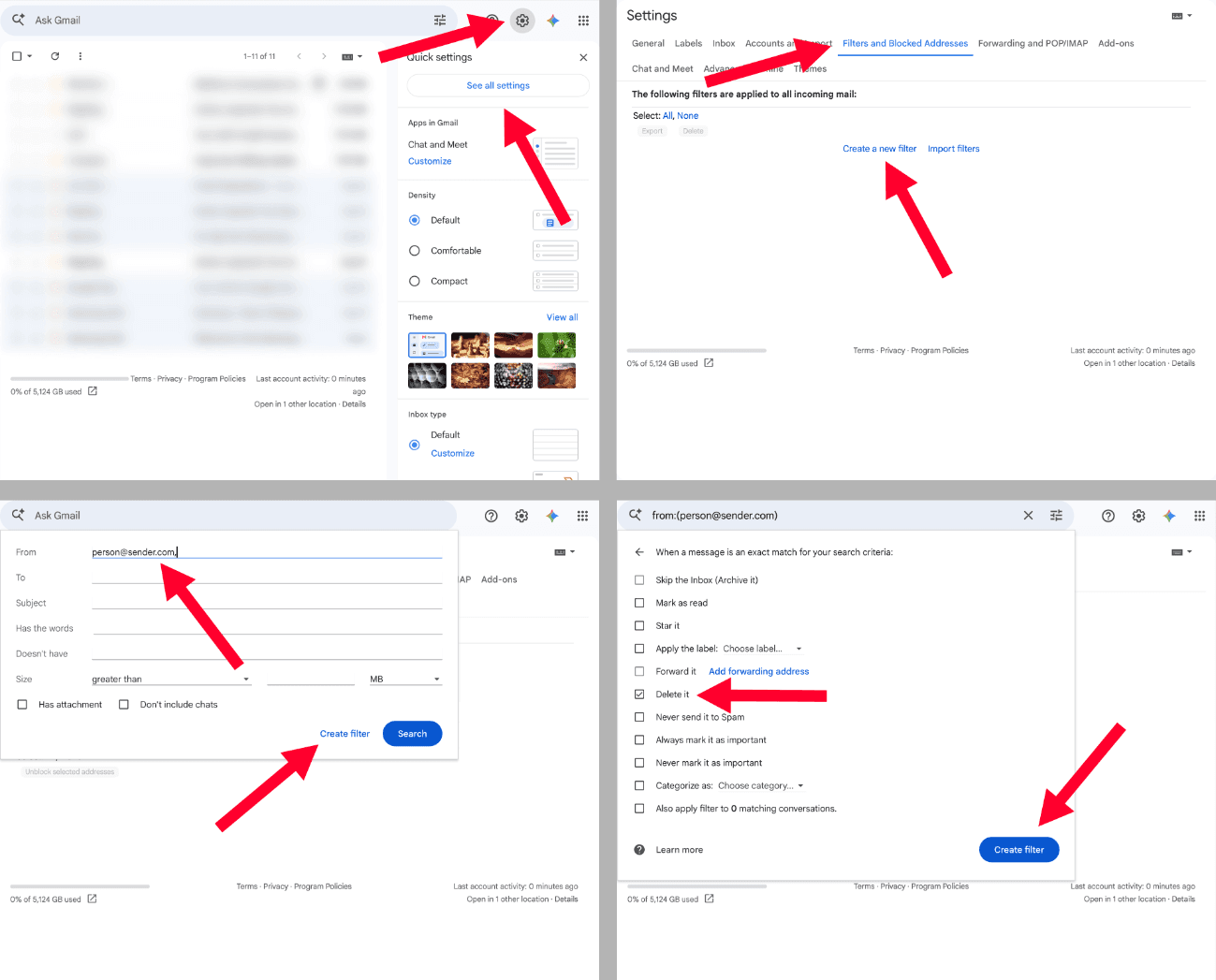
  2. Get creative with Gmail labels: Google gave Gmail a neat little trick that lets you target emails with specific keywords, or that arrive from certain senders, and automatically throw them in the trash. To set up one of these filters, open Gmail in your web browser on a computer, click the Settings cog in the top right corner, then select “See all settings.” From here, go to “Filters and blocked addresses,” and create a new filter. Type in the information you want to target and select “Create filter.” On the checkboxes page, mark “Delete it.” Lastly, click the “Create filter” button, and you’re all set. No more political emails.

Screenshots by Zach Laidlaw/Gmail

  1. Hit the spam button anyway: When a political email drops into your inbox, you reserve the right to relabel it as spam. While this may not keep the next email from that campaign from hitting your inbox again, your efforts can help suspend the account or even terminate it.
  2. Use a different email provider: When all else fails, you can always put your Gmail aside and use a different email provider that will let you block political messages from the start.

Election season is all about reaching as many voters on as many issues as possible, but that doesn’t mean you have to listen to it. Follow these steps and reclaim a bit of your sanity, at least for your email inbox.

Like Blaze News? Bypass the censors, sign up for our newsletters, and get stories like this direct to your inbox. Sign up here!

Deceptive slop is now junking up our favorite map apps. Don't be fooled.


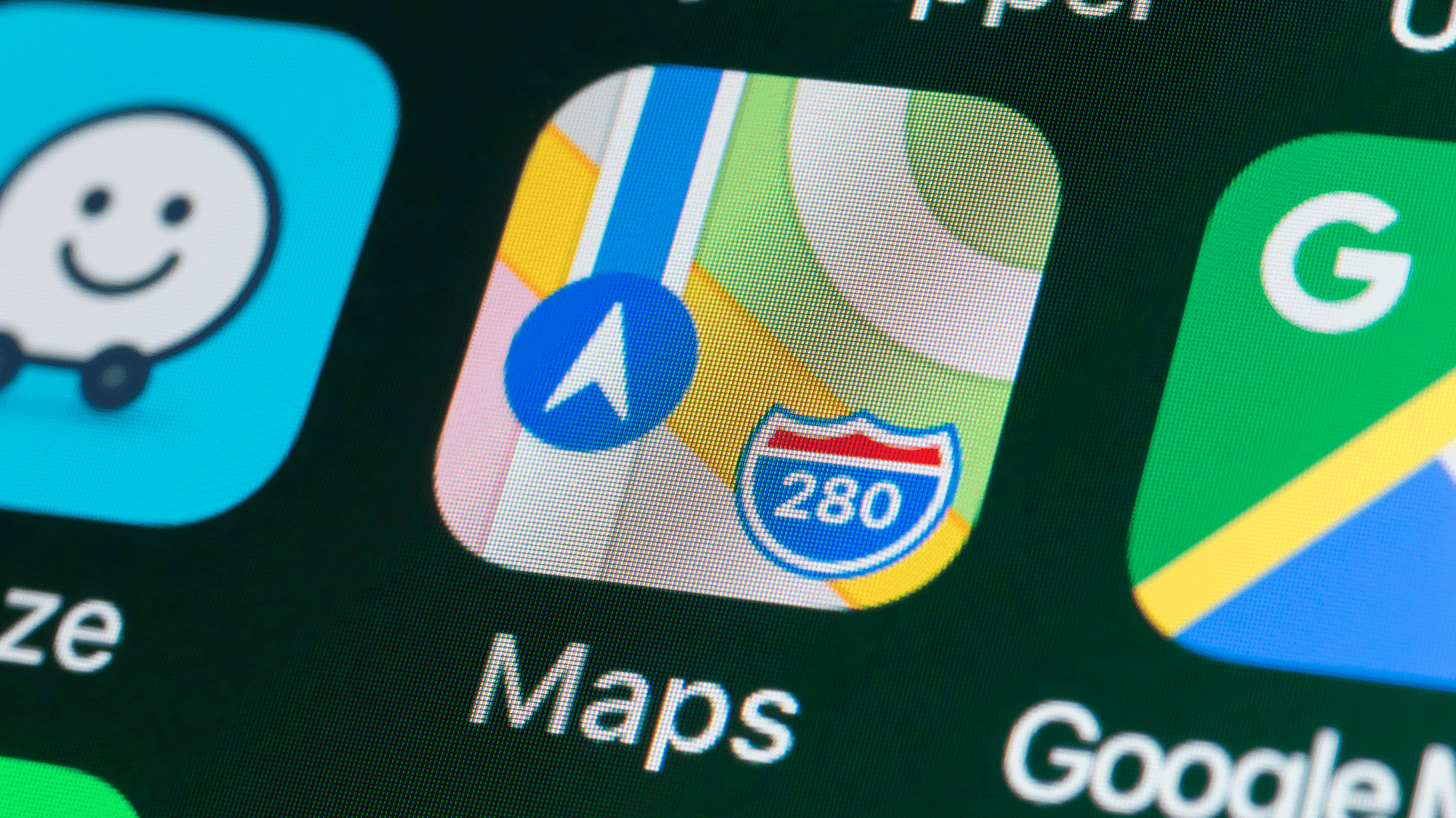
Apple Maps has come a long way since it replaced Google Maps on iOS in 2012. Detailed roads, precise directions, and a visually pleasing interface are just some of the perks you can expect. Unfortunately, Apple decided that its navigation app needed the worst feature found in Google Maps, and there’s no way to turn it off.

When Apple ditched Google Maps for its own app on iOS 6 (yes, 6, which launched in 2012), it was a complete mess. Roads were missing, directions were inaccurate, and the satellite view showed jagged and misshapen spans of highway. Ditching Google for its own map service was one of the worst decisions executed under Tim Cook’s new leadership.

'Mobile ads suck.'

However, instead of throwing in the towel, the company spent years improving the mess it made. The result was a surprisingly complete navigation system that addressed all previous issues and turned Maps into a reliable road companion that works as you’d expect. In fact, once the bugs were stomped out, Apple Maps became a cleaner and prettier alternative to Google Maps, just as Apple envisioned.

Unfortunately, that’s all about to change.

Although Google is known for many things, its core business is all about ads. It’s an ad company, with more than half of its annual revenue attributed to this category. Google ads show up everywhere — in online searches, webpages, and even in some of its apps, like Google Maps.

Apple, on the other hand, is a hardware company that has since dipped its toes into services to expand its bottom line. It is not an ad company, but that hasn’t stopped Apple from taking the plunge into Google’s arena.

Apple Maps Ads/Apple

Much to users’ chagrin, Apple has brought ads to the Apple Maps experience for the first time. Now, when you search for a place — like a fast-food restaurant or a grocery store — Maps will offer up the expected list of locations, plus new paid options.

These show up as “Suggested Places,” making them sound more like friendly recommendations, but don’t be fooled.

These are paid placements added by companies trying to get your attention and your money.

On the bright side, ads don’t show up with every search in Apple Maps — just the ones where Apple has a relevant paying partner. Still, it’s sad to see Apple inject ads into its services for a bit of extra revenue, where the high prices of its devices once sufficed.

RELATED: New hack poses biggest iPhone threat in 19 years: What you can do

Xaume Olleros/Bloomberg/Getty Images

The late Steve Jobs likely would’ve disapproved. He even once went on record to proclaim that “mobile ads suck,” largely because they disrupted the user experience. Apple’s most recent former CEO, Tim Cook, believed differently. According to Mark Gurman, Cook said “digital advertising is not a bad thing. What is not good is vacuuming up people’s data when they’re not doing so in an informed basis. We try to put the user in the driver seat there to own their data.”

As for what new CEO John Ternus believes, we don’t know yet. He just took the reins of the company at the start of September, and he has a lot of work ahead. That said, ads in Apple Maps just launched, so unless Ternus is adamant about their removal, they’re not likely to go away anytime soon.

Like Blaze News? Bypass the censors, sign up for our newsletters, and get stories like this direct to your inbox. Sign up here!

Stronger security and privacy is coming to Android, but will it come in time?


If you use an Android phone, your device could be in line to get a privacy upgrade. Google’s bringing a new web standard to its mobile operating system to protect your web traffic from potential spies. However, only a small number of devices will have access to it at launch, and there is a caveat that could slow down the rollout indefinitely.

Unless you have a trusted VPN installed on your device, your web traffic is openly visible to a number of third-party groups, namely your internet service provider and your network administrator (if you’re using a public network). On top of that, every website you visit can see your IP address, device type, browser type, and more.

Google’s new tools are meant to make your phone and your apps safer, more secure, and private.

Even as websites have adopted HTTPS encryption to protect the data exchanged within your favorite sites, your ISP still knows every online spot you visit in a given day, month, or year. This allows outside sources to track your activity, both for innocuous and nefarious reasons.

Google’s new privacy upgrade aims to change that.

The new standard, dubbed Encrypted Client Hello, hides your web traffic from outside sources by encrypting destination websites, thus obscuring your browsing habits and making them harder to track. It’s not just the web either. ECH can also protect web traffic within your favorite apps. Furthermore, apps will be subject to Local Network Protection, another new feature that blocks the apps on your phone from scanning your Wi-Fi network for other connected devices without your permission.

Together, Google’s new tools are meant to make your phone and your apps safer, more secure, and private, but how do you enable it? To get ECH up and running on your Android phone, there are several things you’ll need before you’re protected.

First, ECH is only available on devices that run Android 17, which is a relatively small pool of candidates at the time this was published. Users that own a Google Pixel 6 and newer, or a Samsung Galaxy S23 and newer, either already have Android 17 or will get access very soon. To check the Android version on your device, open the Settings app, find the “About phone” section, and you’ll see your Android version under “device details” on Pixel or “Software information” on Galaxy.

RELATED: New malware is crippling Android phones, but not yours if you do this

Jutharat Pinpan/Getty Images

Second – and this one is the big caveat – many of those same groups that can currently track your web activity have to enable ECH before it will work. That means websites, app developers, and internet service providers all have to implement ECH, otherwise your traffic will remain visible, just as it is today. Even worse, these same groups can actively opt out of supporting ECH, rendering the new standard completely useless.

For what it’s worth, Google claims that it’s lobbying “industry leaders, service providers, and app developers to accelerate ECH adoption,” but it faces a difficult road ahead. Since the standard isn’t mandatory, plenty of groups will likely ignore Google’s attempts to make ECH a mainstream part of Android. In truth, the groups that implement it will be the ones that had no interest in tracking users’ browser activity in the first place, while the groups that are monitoring activity will simply ignore ECH altogether.

In this way, ECH is unlikely to offer much privacy to users in the Android ecosystem, at least not anytime soon. If you really want to protect your internet traffic, you’re better off with a trusted VPN instead.

Like Blaze News? Bypass the censors, sign up for our newsletters, and get stories like this direct to your inbox. Sign up here!