Spam texts are surging. Here's how to stop them on your phone.



Spam texts are on the rise, mucking up your phone with group chats filled with people you don’t know and who didn’t ask to be lumped together for some nefarious reason. While these texts might seem like a simple nuisance, they can ultimately lead to more spam, phishing attempts, or worse. Just like with spam calls, though, there’s an easy way to silence spam text alerts and block messages from your phone.

Spam texts are on the rise

If you’ve received more spam text messages lately, you’re not alone. Consumer Reports confirmed that text-based scam attempts have risen by 50% as of 2025. Part of this is due to the broad-scale availability of RCS, a fairly new texting standard that replaced the antiquated SMS on both Android and iPhone. Although RCS is generally more private and secure than SMS, the new service makes it easier for scammers to send media attachments designed to get you to click through to a spam website where they can steal your private information.

What to do if you receive a spam text

If you receive a spam text, do not respond! Don’t ask why you’re in the group chat, don’t demand the head of the person who added you, don’t talk to anyone else that asks the same things, and for the sake of your future sanity, don’t click on any shared links. Doing any of these actions simply confirms to the sender that your phone number is valid, and you will be added to other spam lists for future scam calls and text messages. It’s better for spammers to think your number is inactive than to let them know that you are a viable target. Instead, here’s what you should do the next time you receive a spam text message.

How to block spam texts on iPhone

On iPhone, open up the Settings app. Scroll down to the very bottom of the page and tap “Apps.” From there, scroll to the center of your app list and tap into “Messages.” Scroll halfway down the page again and find the section titled “Unknown Senders.”

From here, you’ll want to enable “Screen Unknown Senders.” This will automatically flag any text messages you receive from unknown numbers and move them to a separate list within your Messages app. Next, check the “Time Sensitive” toggle. This will allow alerts, two-factor verification codes, and urgent texts to still come through so you won’t miss anything important that’s non-spam related. Finally, check the “Filter Spam” option to hide spam notifications and move these unwanted messages to a separate list in the Messages app. With these features enabled, you won’t be alerted when a spam text comes in, but you’ll still get the chance to review the message and decide if it’s actually spam.
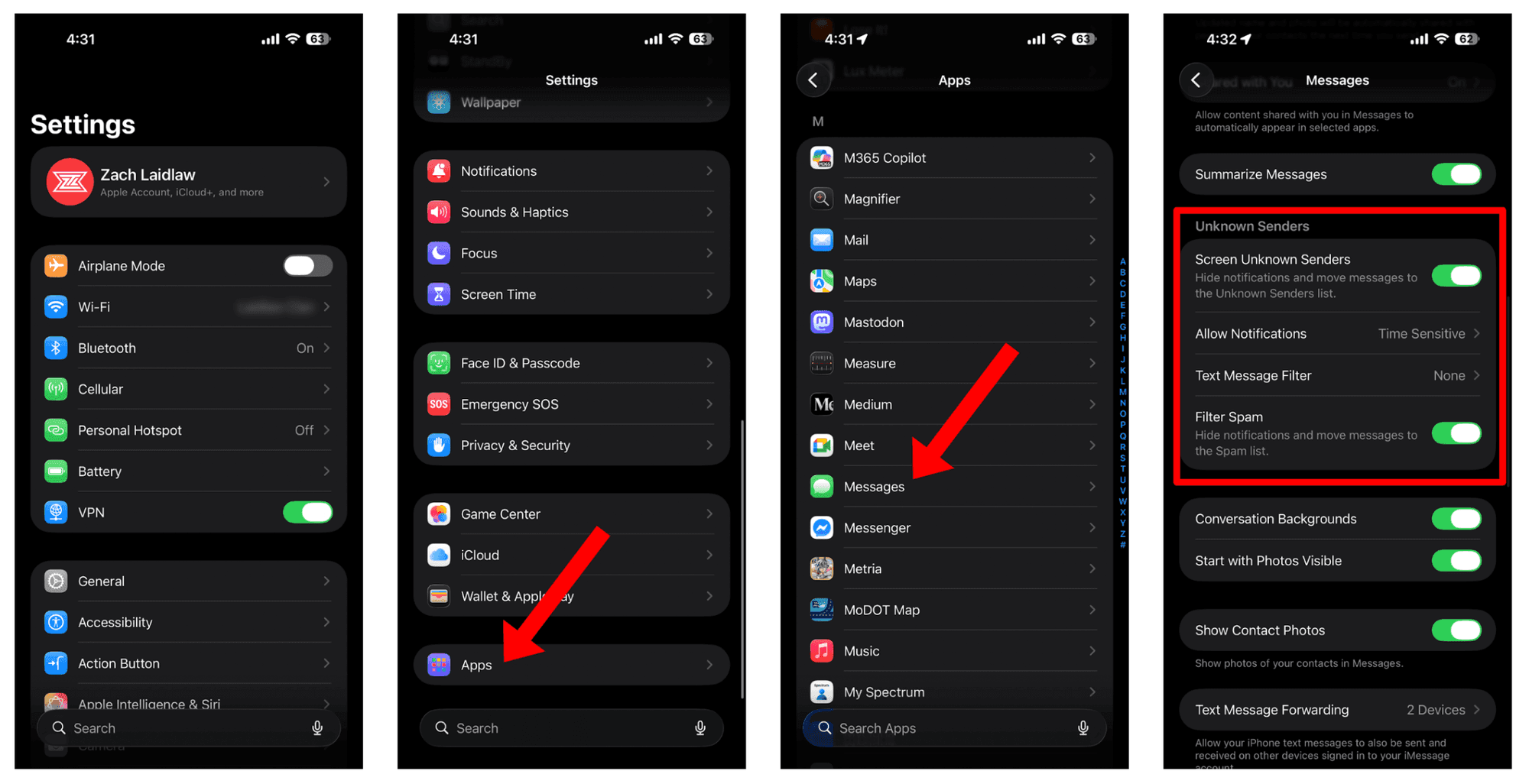
Screenshots by Zach Laidlaw

TIP: Keep in mind that these settings are available on iPhones running iOS 26. You may not see these options, or they may be slightly different, if you’re on an earlier version of iOS.

If you want to view your quarantined spam texts, open the Messages app on your iPhone. Tap the filter menu in the top right corner. Click on either “Unknown Senders” or “Spam,” depending on which you want to view. From here, you can either read the messages for fun, remove them from the spam list if they’re not actually spam, or delete them entirely. Whatever you do, though, don’t reply.

How to block spam texts on Android

For Android, we’re specifically looking at the spam blocking features built directly into the Google Messages app. If you’re using a different messages app, these features may differ or may not even be available. For what it’s worth, Google Messages is the best native SMS and RCS app on Android, thanks to its simplicity, security, and broad support. I strongly recommend switching to Google Messages if you haven’t already.

To get started, open the Google Messages app on your Android phone. Tap on your profile picture in the top right corner, followed by “Messages Settings.” Near the bottom of the page, select “Protection & Safety.” Finally, toggle “Spam Protection” into the on position. Once enabled, Android will automatically scan and filter your spam text messages into the spam section in your messages app.
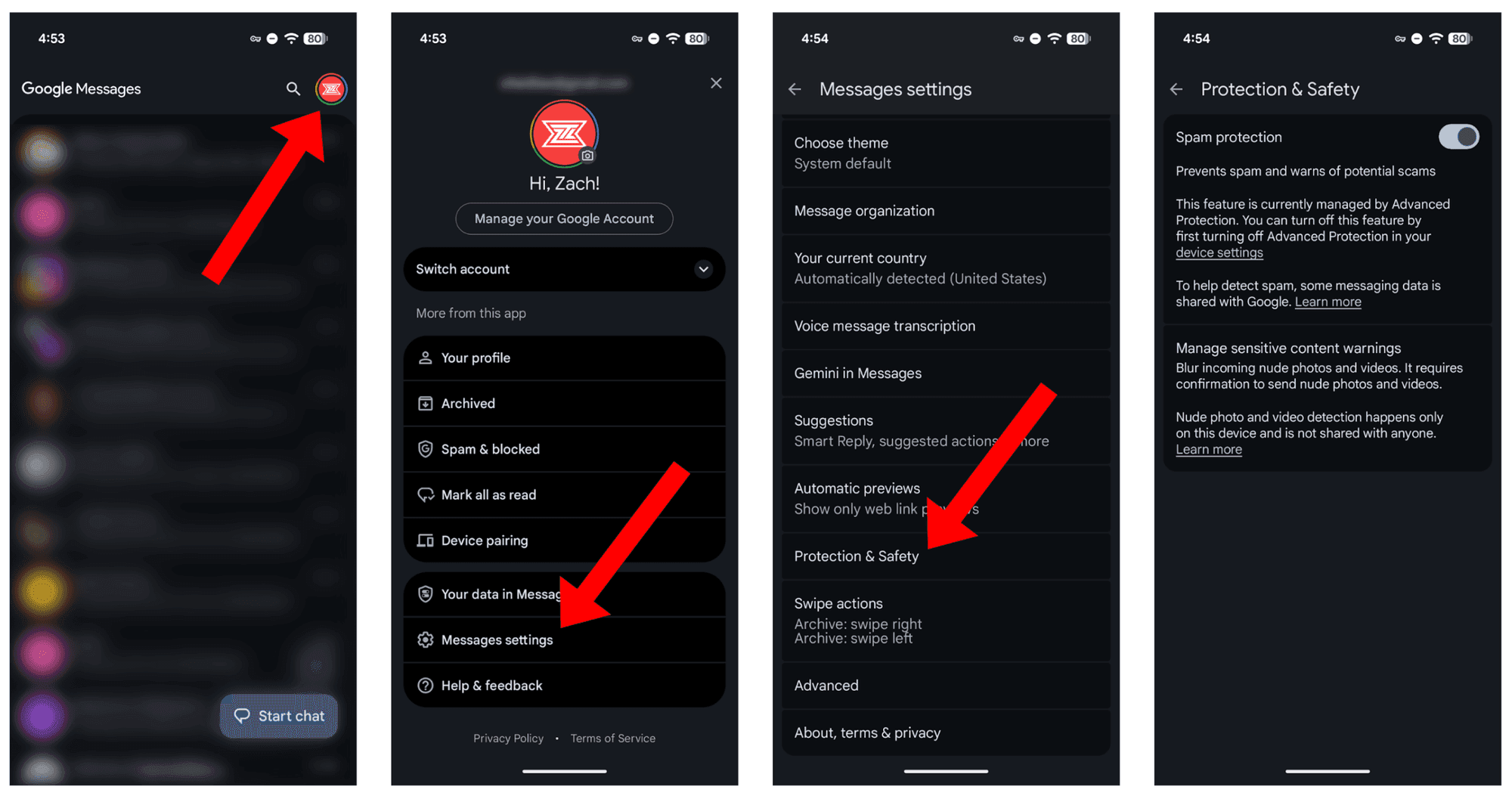
Screenshots by Zach Laidlaw

WARNING: Although most of Android’s spam detection features happen directly on the device, Google admits that “spam information is sent to Google anonymously to improve spam and abuse protection.” This information can include the phone numbers of unknown senders who aren’t in your contacts list. Google maintains that your name and phone number are not shared with Google and that your identity remains anonymous.

Reclaim your messages app

Spam text messages are annoying, but thanks to these features built directly into iOS and Android, it’s easier than ever to make them disappear. Toggle a few quick settings and reclaim the peace of a quiet messages app where only the people you want to talk to can actually reach you.
FINALLY: Here's how to stop smartphone spam calls


Three things are certain in life: death, taxes, and spam phone calls.

Robocalls are on the rise these days with an estimated 2.5 billion calls targeted at U.S. residents per month. Instead of letting your phone ring off the hook, try out these free spam-blocking tools for Apple iPhone, Samsung Galaxy, and Google Pixel.

It’s easier than ever to block calls with the latest anti-spam features built directly into your phone.

How to block spam calls on Apple iPhones

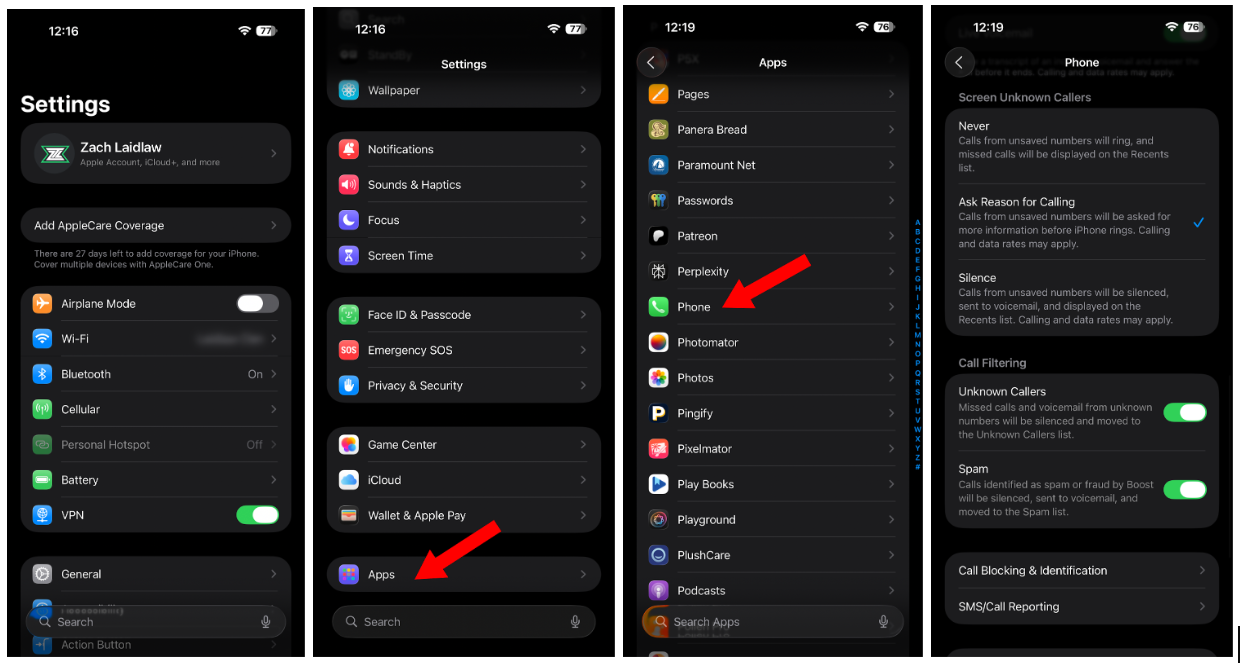
To use Apple’s new call-blocking features, you’ll need to download the latest iOS 26 update. If you don’t like the way it looks, don’t worry; here are some quick tips to make it a little easier on the eyes. Once you’re ready, open the Settings app on your phone, scroll down to Apps, then tap Phone. Scroll down again and find the Screen Unknown Callers section. Now choose from one of the three options:

  1. Never: allows spam callers to continue to bother you, unabated.
  2. Ask Reason for Calling: will prevent your phone from ringing when an unknown number tries to reach you. Using AI, your iPhone will send the caller a message, asking them why they’re calling. You will then receive a notification with their response. If the call is legitimate, you can pick it up and speak to the person on the line, or if it’s spam, you can simply ignore it. Most of the time, scammers will hear the call screen message and hang up on their own, leaving you in peace.
  3. Silence: prevents your phone from ringing when an unknown number calls.

Beneath this section, you’ll also find Call Filtering. This setting lets you completely silence missed calls and voicemails from unknown numbers. This is especially useful if you get a lot of unknown calls and you simply don’t want to be bothered.

Screenshots by Zach Laidlaw

How to block spam calls on Samsung Galaxy Android phones

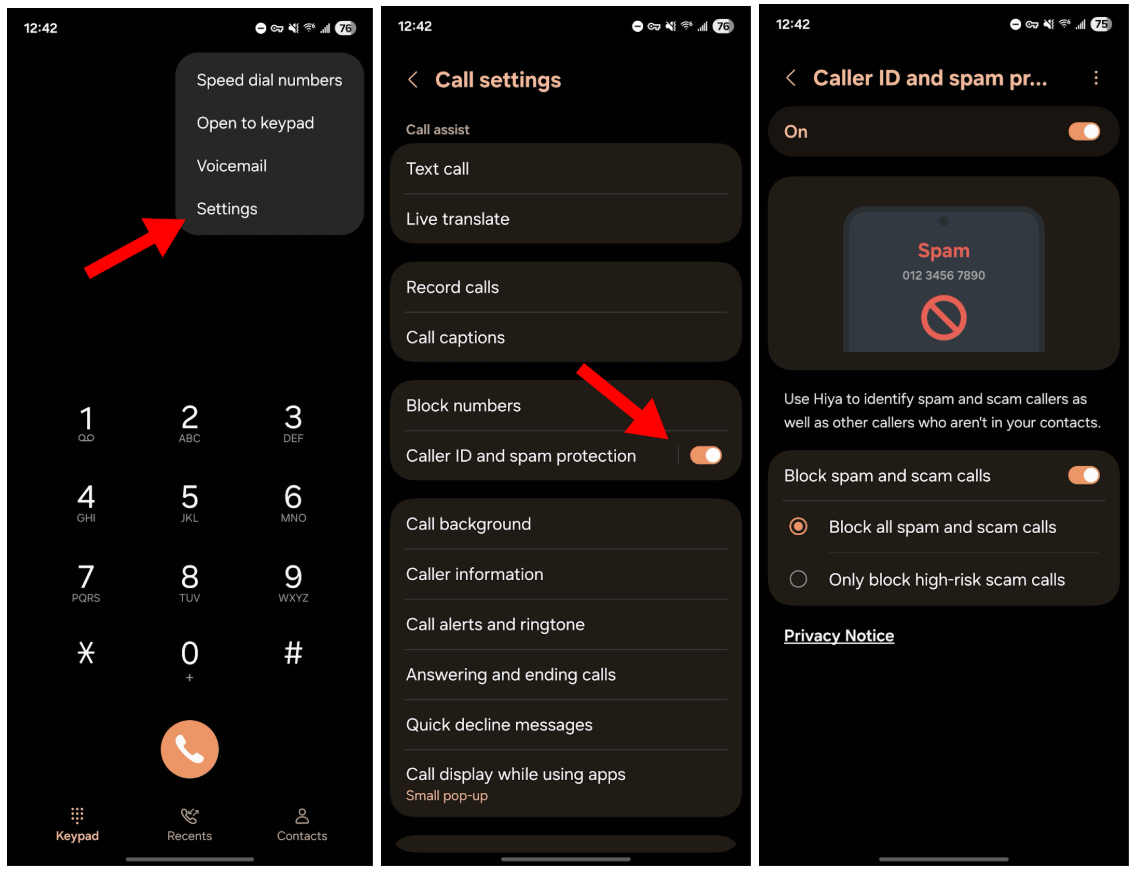
Built with the anti-spam service Hiya, Samsung’s Smart Call feature is baked directly into Samsung Galaxy phones starting with the S8 and newer. You can enable it by opening the Phone app on your Galaxy phone, tap on the three dots in the top right corner, tap Settings, and then flip on the Caller ID and spam protection toggle. Tap on this section one more time to go a bit deeper, and choose whether you’d like to block high-risk calls or spam calls altogether.

Once that’s complete, all incoming phone calls will run through Hiya’s robust spam detection database. If you only choose to block high-risk numbers, a message will pop up on your screen to identify other potential spammers, scammers, or fraudsters as they come in, and you’ll have the option to report or block them. If you choose to block all spam calls, suspected spammers will be silenced entirely, restoring a modicum of peace to your digital life.

Screenshots by Zach Laidlaw

How to block spam calls on Google Pixel Android phones

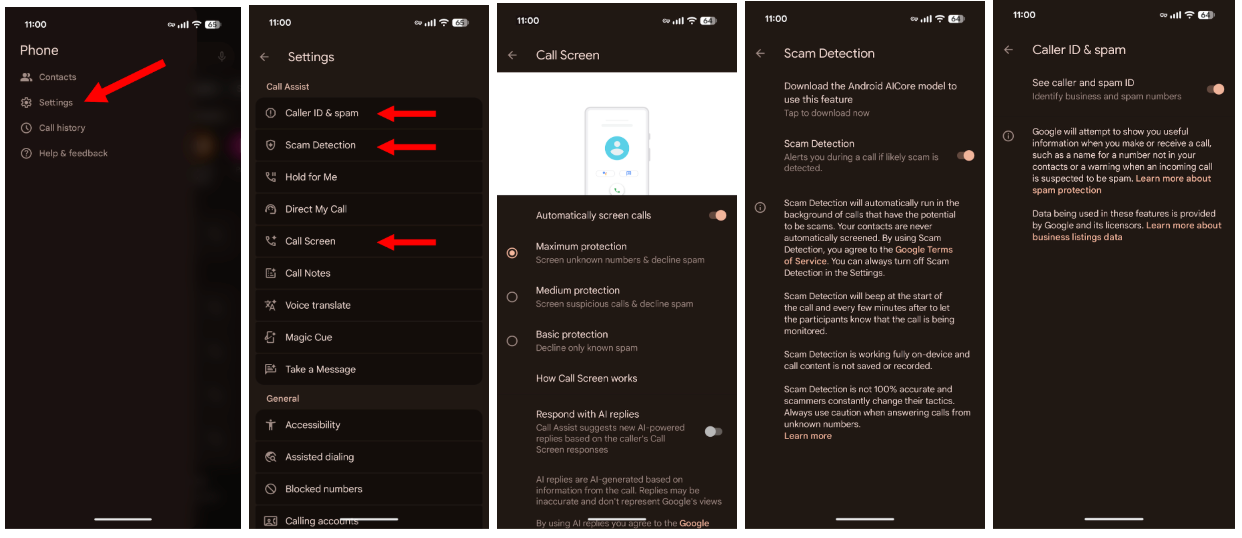
Built exclusively for Google Pixel phones, Call Screen uses AI to identify suspicious phone numbers. When a call comes in, Google Assistant can answer on your behalf, ask the caller why they’re trying to contact you, and provide a live transcription of their answer so that you can decide if you’d like to pick up. Call Screen can also automatically decline calls from spammers without alerts or notifications, leaving you blissfully unbothered.

To enable Call Screen and other useful spam-blocking features, open the Phone app on your Google Pixel and tap the hamburger menu in the top left corner. Under Call Assist, enable Caller ID & Spam to identify spam numbers. You may want to check Spam Detection next, which will alert you, in real-time, if a caller is trying to scam you during an active conversation. Finally, enable Call Screen to automatically review your incoming calls and manage them based on one of these three settings:

  1. Maximum Protection screens all unknown numbers and declines spam.
  2. Medium Protection only screens suspicious numbers and declines spam
  3. Basic Protection only declines spam, leaving you open to the widest range of unknown callers.

Screenshots by Zach Laidlaw

One last word of warning

While most spam-blocking tools will silence robocalls, scammers can still use call screening to trick you. Thanks to AI, scammers can leave messages that sound like your friends and family, begging for help, money, or worse. To make sure you’re always talking to the real person, set up a verbal password — something random, like "platypus" or the number "18" — that your friends and family can use to verify their identities, especially if they call from an unknown number.

RELATED: Thin is NOT in: Why nobody is buying the new Apple and Samsung phones

Photo by NurPhoto / Contributor via Getty Images

In most cases, robocalls are trivial at best, and it’s easier than ever to block them with the latest anti-spam features built directly into Apple iPhones, Samsung Galaxy devices, and Google Pixels.

Simply turn them on and enjoy that much-needed peace and quiet from those forever-unknown callers.

Slop and spam, bots and scams: Can personalized algorithms fix the internet?


From the super-spam Google search results loaded with videos instead of web pages to the “paid for by” advertisements heavy in social media feeds these days, it’s hard not to notice the internet morphing into … well, some call it slop (others use another four-letter word). Whatever your taste, or lack thereof, AI is sure to play a major, transformative role. Offsetting the massive and justified concerns are several palliative possibilities for the preservation of our humanity online — one of them in consideration is the so-called individual or customized algorithm.

This is, in essence, a filter on the internet or in parts of it, such as particular websites, whereby you, an AI bot, or another entity (perhaps the operator of certain sites and apps) uses the overlay to curate your feed.

As an example, you’re scrolling the X.com timeline and decide you actually do value, say, the political takes of your ideological enemy but have no interest at all in connecting with or understanding various factions within your own presumed ideology. In terms relative to the “discourse,” it’s sort of a nuanced position. An algorithm tailored to enhance your predilections may be an option. Doesn’t exactly sound like the “town hall of the internet,” much less the “global public square,” but it might keep users engaged, and it might be useful for certain types of searches, engagements, and analysis.

Even as the Trump administration works day and night to unravel decades of graft, fraud, and frankly traitorous activity at society’s many levels, what exactly do we want and need out of the internet so we can thrive?

Continuing with the X.com hypothetical, perhaps the programmers under Elon could, and this is the thrust of the issue, decide to allow for the application of various user-determined control parameters onto your feed, such that it weeds out what you want to ignore and gathers more of what you have determined you value. Seems straightforward, right? Why not roll it out and offer it as a subscriber add-on? Even if it’s not entirely customized, it’s getting close.

There are cost barriers and security considerations. Aren’t there always such barriers, though? Programming, maintaining, and monitoring such tailored algorithms and similar individualization is heavy on the compute. Compute requires energy, which requires money. The relative homogeneity of websites allows for economic, efficient computation — but doesn’t it also work to homogenize us, our desires, and perspectives?

RELATED: Liberal comedian lashes out at Netflix over Dave Chappelle special: 'F*** you and your amoral algorithm cult!'

This seems to be the battleground we find on ourselves on now.

The other major obstacle from the point of view of the internet proprietor relates to the opportunity for scams that might arise if users are granted these tools of curation. The argument is that if individuals are granted or otherwise obtain (perhaps via AI) the technological tools to curate their own feeds more deeply than they do now, those same tools will open opportunities for scams of various sorts.

One such argument points to the use of AI-assisted algorithms deployed into a context like X.com with the objective of gathering intelligence, data, and so forth — to be leveraged later in some separate context? This happens already, as we all know, but evidently supercharging these efforts opens yet more vulnerability online. Or so the argument goes. So it’s hard to say with any certainty how effective or useful or desirable the option for individualized algorithms will be in the absolute aggregate. Does it matter? Well, at a spiritual level, maybe not. However, at immediate survival, social, and viably employable levels of concern, yes, the internet absolutely still matters a great deal. For most people, just walking away isn’t an option.

And so the question many people are asking, even as the Trump administration works day and night to unravel decades of graft, fraud, and frankly traitorous activity at society’s many levels, is what exactly do we want and need out of the internet so we can thrive? It’s going to be more than pure market logic. How can we wrangle this thing to serve everyday Americans, or even mankind, while we’re at it?

Let me offer two basic predictions. One, the internet will continue with the logic of homogenization, of monoculture, which appears to describe and define most of corporate culture, and as a result, the internet may likely stratify more than splinter. Individual algorithms will pass away as just another stab in the dark of cyberspace exploration. Two, the homogenization will nevertheless finally become unprofitable — at least to the point where, beyond pure market operations, some of the more enjoyable and human operations will open up. Perhaps individualized algorithms wind up functioning as an effective stopgap, a Band-Aid, until we can get bigger medicine — wisdom — involved.

Conservative Groups Flooded By Fake Event Registrations

'A recurring and often significant issue'